A Raspberry Pi on a Patchy Connection: Readings Wait in a ukue File Until the Internet Is Back
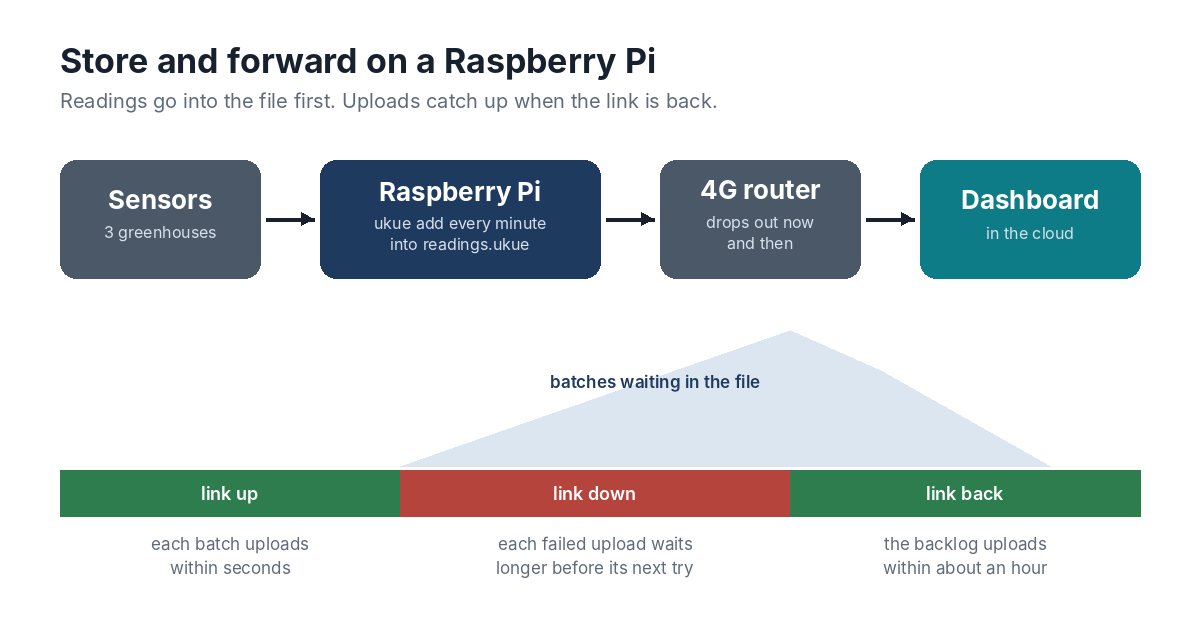
Think of a market garden with three greenhouses, each with temperature, humidity and soil sensors wired to a Raspberry Pi. Every minute the Pi reads the sensors and sends the numbers to a dashboard in the cloud, where the grower checks them on a phone and gets an alert if a greenhouse overheats. The internet comes from a 4G router on a pole, and it drops out: a few minutes in bad weather, half a day when the mast is down. A script that simply posts each reading loses every minute the connection is gone.
The standard answer is store-and-forward. The Pi writes each batch of readings to its own storage first, and uploads whatever is waiting whenever the connection allows. That’s a job queue on one small machine, and ukue fits it well: one static binary, one file, and no server to keep running on the Pi.
Setting Up the Pi
ukue’s ARM64 Linux build, from the download page, is a single static binary, so it runs on 64-bit Raspberry Pi OS with nothing else to install:
tar -xzf ukue_linux_arm64.tar.gz
sudo mv ukue /usr/local/bin/
ukue init /var/lib/greenhouse/readings.ukue
Recording the Readings
The script that reads the sensors no longer posts anything. It adds each minute’s batch to the queue, with the batch on standard input:
read-sensors | ukue add --attempts 1000 /var/lib/greenhouse/readings.ukue upload
--attempts 1000 is the important part. By default a job gets 10 attempts over about an hour and a half before it’s set aside as dead. That suits an email. It doesn’t suit a field device that may be offline for a day. After the first few retries ukue waits an hour between attempts, so 1,000 attempts keep a batch alive through about six weeks without a connection.
Uploading
A second command runs as a service and uploads each batch with curl:
ukue work /var/lib/greenhouse/readings.ukue upload -- \
  curl --fail --silent --max-time 30 --data-binary @- https://dashboard.example.com/api/readings
ukue work gives each batch to curl on standard input, and --data-binary @- posts it unchanged. When the upload succeeds, curl exits with status 0 and the job is deleted. When the connection is down or the dashboard answers with an error, curl exits with another status, and ukue tries again later: after 10 seconds, then 20, then 40, doubling until the waits reach an hour.
What an Outage Looks Like
When the 4G link drops, nothing changes on the Pi. Readings keep arriving as jobs, uploads keep failing, and each failed job waits a little longer before its next try. When the link comes back, the waiting batches go up as their next attempts come round: the newest within seconds or minutes, the oldest within about an hour. Each batch carries its own timestamps, so the dashboard can file late arrivals in the right place.
If an hour is too long to wait, a small Go program can do the same job with a shorter cap, using ukue.WithBackoff(10*time.Second, 5*time.Minute) when it opens the file. The command line keeps the defaults.
Power Cuts
Greenhouses lose power too. ukue writes every job with SQLite’s synchronous = FULL, so a batch that ukue add accepted is on the storage before the command returns. An upload cut off halfway leaves its job held under a lease, and once the Pi is back up and the lease has run out, the job goes back on the queue. In ukue’s tests, workers were killed with SIGKILL 250 times at random moments while they worked through 8,000 jobs, and no job was lost.
There’s one condition, and it’s the storage. A cheap SD card can report data as written while it’s still in the card’s cache, and lose the last few writes when the power goes. A good-quality card, or a small USB SSD, avoids that. One small batch a minute is a light load for either.
Checking In
ukue stats on the Pi shows how many batches are waiting and how long the oldest has waited, which is also a quick measure of how far behind the uploads are after an outage. The same setup suits any small Linux box that collects data where the internet is unreliable: a weather station, a shop’s till, a vending machine, a delivery van.