Signup Emails From a Python Web App, Sent in the Background With ukue
Say a three-person team runs a Flask app where people book cooking classes. Every new account gets a welcome email, and today the app sends it inside the signup request. On a good day that adds a second or two to the page. On a bad day the mail provider is slow or down, the request hangs, and a new customer sees an error on the first thing they ever tried to do on the site.
The usual cure is a job queue, and for a Python app that usually means Celery with Redis or RabbitMQ behind it: two more things to install and keep running, for one email per signup. Here’s how the same app could do it with ukue, which keeps the queue in one file and needs one small binary to run the jobs.
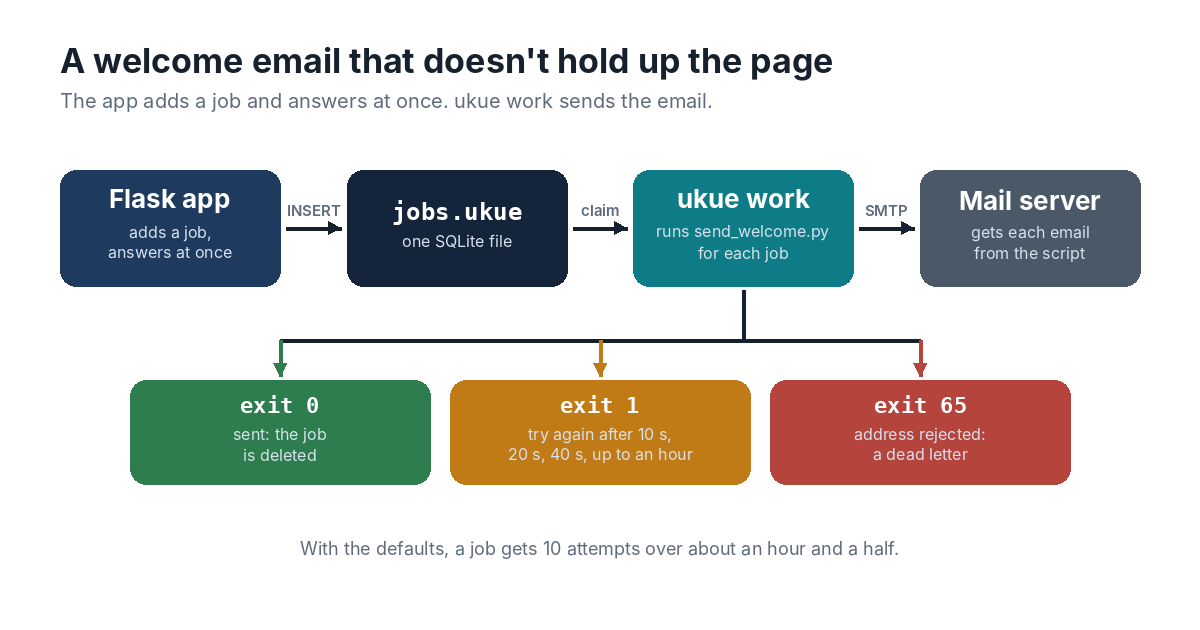
Adding the Job
The queue file is created once on the server:
ukue init /srv/classes/jobs.ukue
A ukue file is an SQLite database with a documented layout, so the app doesn’t need a client library to add a job. The ukue repository has a short script, add_job.py, that does it with Python’s standard library and one INSERT. The team copies it into the app and calls it from the signup view:
import json
from add_job import add_job

@app.post("/signup")
def signup():
    user = create_account(request.form)
    add_job("/srv/classes/jobs.ukue", "email",
            json.dumps({"to": user.email, "name": user.first_name}))
    return redirect("/welcome")
Adding the job is one small write to a file on the same disk. It’s flushed to disk before add_job returns, so the job survives even if the server crashes a moment later, and the page comes back at once. Nothing in the request talks to a mail server any more.
Sending It
The email goes out from a separate script, run by ukue work, which hands each job’s payload to the script on standard input:
ukue work /srv/classes/jobs.ukue email -- python3 send_welcome.py
# send_welcome.py
import json, smtplib, sys
from email.message import EmailMessage

job = json.load(sys.stdin)
msg = EmailMessage()
msg["From"] = "[email protected]"
msg["To"] = job["to"]
msg["Subject"] = "Welcome to the kitchen"
msg.set_content(f"Hi {job['name']}, your account is ready.")

try:
    with smtplib.SMTP("localhost") as smtp:
        smtp.send_message(msg)
except smtplib.SMTPRecipientsRefused as e:
    code, _ = next(iter(e.recipients.values()))
    sys.exit(65 if code >= 500 else 1)
The exit status is the whole contract between the script and the queue. Status 0 means the email went out, and ukue deletes the job. Status 65 means the mail server rejected the address for good, with a 5xx answer, and another try won’t change that, so the job goes straight to the dead letters. Anything else means try again later, and that includes a timeout or a refused connection, which crash the script with status 1. ukue waits 10 seconds, then 20, then 40, doubling up to an hour. With the defaults, a job gets 10 attempts over about an hour and a half.
The worker runs as a systemd service, so it starts with the server and comes back if it stops. When systemd stops it for a deploy, ukue work takes no new jobs and gives a running script time to finish.
When the Mail Provider Goes Down
Nobody notices the outage any more. Signups carry on, jobs pile up in the file, and the emails go out as soon as the provider is back. One command shows how many are waiting and how long the oldest has waited:
ukue stats /srv/classes/jobs.ukue
The dead letters are mostly addresses with typos in them. ukue list --state dead lists them, and ukue show prints one with its payload and last error, which for a script is the exit status and the end of what it wrote to stderr. So support can see exactly who never got a welcome email. If the cause was on the team’s side instead, say a wrong SMTP password that made every send fail until the jobs ran out of attempts, one command sends them all back once the password is fixed:
ukue retry --all --queue email /srv/classes/jobs.ukue
One Thing to Accept
ukue runs every job at least once. If the worker machine dies after the mail server accepted an email but before ukue marked the job done, the job runs again, and the new member gets two welcome emails. For a welcome email that’s harmless. A job where a repeat would cost money needs its own guard, such as an ID the other side uses to drop duplicates.
If the app later grows to two servers, the queue can stay where it is. ukue serve puts the same file behind a small HTTP API, and the second server adds its jobs over HTTP.