Photo Upload Thumbnails With ukue: Previews First, Print Sizes When the CPU Is Free
Take a portfolio site where photographers upload full-size JPEGs after a shoot, a few hundred at a time and 20 or 30 megabytes each. Every photo needs three resized copies: a 400-pixel thumbnail for the gallery grid, a 1600-pixel version for the lightbox, and a 3000-pixel file for print orders. Resizing a big JPEG takes real CPU time, and doing it inside the upload request turns a 300-photo upload into a long wait behind a progress bar that seems stuck.
So the site saves each original, answers the upload straight away, and leaves the resizing to a job queue. With ukue that queue is one file next to the photos plus one worker command, and its priorities settle the question that matters most to the photographer: what gets done first.
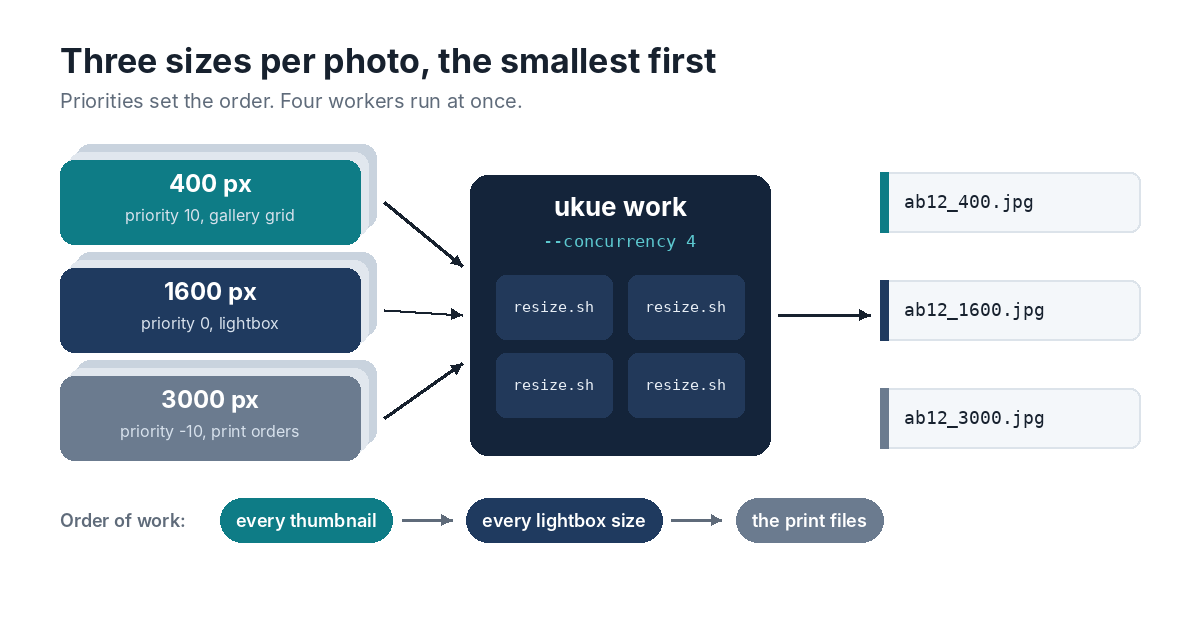
One Job per Size
For each uploaded photo, the site adds three jobs to the same queue, with a different priority on each:
ukue add jobs.ukue resize --priority 10  '{"photo": "2026/10/ab12.jpg", "size": 400}'
ukue add jobs.ukue resize                '{"photo": "2026/10/ab12.jpg", "size": 1600}'
ukue add jobs.ukue resize --priority -10 '{"photo": "2026/10/ab12.jpg", "size": 3000}'
These are the command-line versions. A site written in Go would call Enqueue with ukue.Priority(10), and one in any other language could use the HTTP API or write the row into the file directly.
When a worker looks for its next job, it takes the highest priority among the jobs that are due, and the oldest within that priority. So when 300 photos arrive together, every thumbnail is made before any lightbox version, and the print files wait until nothing more urgent is left. The gallery fills in first, which is what the photographer is looking at, and the big exports work through in the background. Priorities run from -100 to 100, which leaves room for later rules, like putting a paying customer’s uploads at 20.
One Worker per Core
ukue work --concurrency 4 --timeout 2m jobs.ukue resize -- ./resize.sh
On a four-core server, --concurrency 4 keeps every core busy with one resize each. --timeout 2m stops a conversion that hangs on a strange file and counts it as a failed attempt. The script gets the job on standard input:
#!/bin/sh
# resize.sh
job=$(cat)
photo=/srv/photos/$(echo "$job" | jq -r .photo)
size=$(echo "$job" | jq -r .size)

[ -f "$photo" ] || exit 65                           # deleted before its turn came
magick identify "$photo" >/dev/null 2>&1 || exit 65  # not an image we can read
magick "$photo" -auto-orient -resize "${size}x${size}" -quality 85 "${photo%.jpg}_${size}.jpg"
Exit status 65 sends the job straight to the dead letters. A photo that was deleted, or a file that isn’t really an image, won’t get better with another try. Any other failure, such as a full disk, makes ukue try again after 10 seconds, then 20, then 40, doubling up to an hour, so the job finishes once someone has cleared some space.
While the command runs, ukue work keeps renewing the job’s lease, so a slow print-size export is never handed to a second worker while the first is still on it. If the server reboots in the middle of a batch, the jobs that were running go back on the queue when their leases run out, and everything else is still in the file, waiting.
Watching the Backlog
ukue stats jobs.ukue
This shows how many resize jobs are ready and running, and how long the oldest due job has waited. If that wait keeps growing on busy evenings, the server needs more cores, or a second machine to share the work. A second machine can’t open the file directly, because SQLite’s locking doesn’t work over network file systems, so it would run a small HTTP worker that claims jobs through ukue serve.
Where It Fits
This is the kind of work ukue was built for: one server, a few workers, and jobs that take seconds. The queue’s own share of the work is tiny next to the resizing. In ukue’s tests, adding, claiming and finishing a job took 1.1 milliseconds, even with 100,000 other jobs waiting in the file.